You search for an app. You find five versions of it across five different sites. Which one is real? Which one is safe?
This is the challenge millions of smartphone users face every day. The app market is massive, and not every source is reliable. Fake reviews, misleading descriptions, and bundled malware are real problems.
This guide shows you how to research mobile applications with confidence. You will learn how to spot red flags, verify developer credibility, and choose sources that hold up under scrutiny.
Let’s dive into the basics before moving to the hands-on steps.
What is Mobile Application Research?
Mobile application research is the process of evaluating an app before you install it. It means checking who built the app, what permissions it requests, and whether real users recommend it.
Students, working professionals, parents, and casual users all benefit from this process. It helps you avoid privacy risks and install tools that actually deliver results.
Done right, this process takes under five minutes and saves a lot of frustration later.
Key Points of a Reliable Research Process
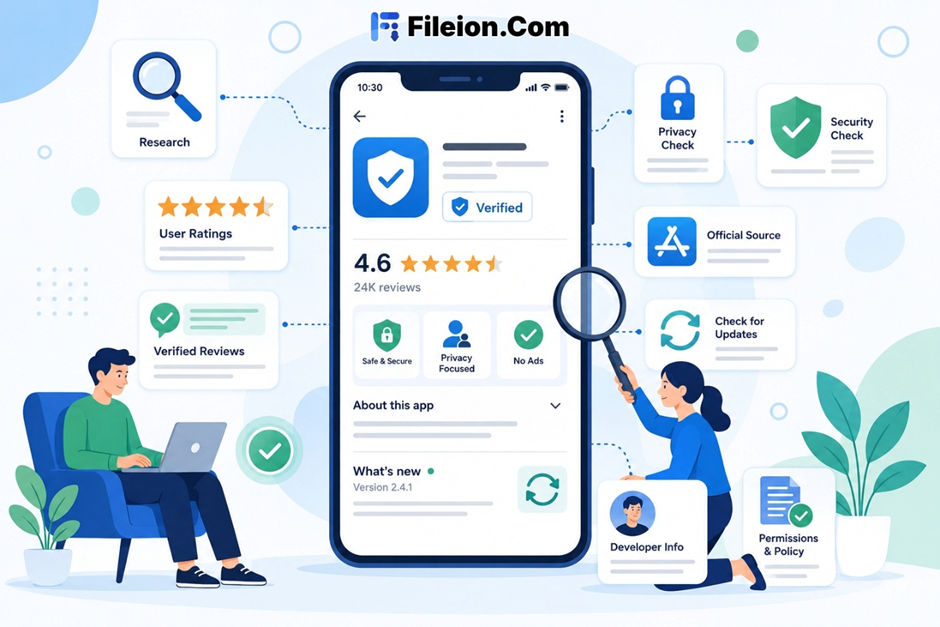
Source Verification: Official app stores provide a first layer of screening, but they do not replace manual checks of the developer, permissions, reviews, and privacy policy. Starting there adds a baseline layer of protection to your research.
Review Analysis: Real user reviews reveal what polished developer descriptions often hide. Reading patterns across multiple reviews gives a clearer picture than any single star rating can.
Permission Transparency: A trustworthy app should request only permissions that match its core function, and any unnecessary request should be treated as a warning sign. This information is typically available in the store listing or the app’s privacy policy.
Update Activity: Recent updates can indicate active maintenance and may help reduce exposure to unresolved security issues. This matters for long-term security and compatibility.
Step-by-Step Guide: How to Find Trustworthy Information About Mobile Applications
- Start with the official app store. Google Play and the Apple App Store are your safest first stop. Both platforms perform basic security screening before publishing any app.
- Check the developer’s name. Look at their published catalog. A developer with a consistent set of active, well-rated apps is generally more reliable than one with a single listing.
- Read the app description carefully. Vague promises, spelling errors, or exaggerated claims are warning signs. A trustworthy description is clear, specific, and avoids over-selling.
- Look at the total download count. High download counts and sustained review activity can be useful signals, but they should be weighed alongside review quality and developer credibility.
- Study the rating breakdown. Do not rely on the star average alone. Look at how reviews are distributed across one through five stars. A genuine app has varied, written feedback attached to its ratings.
- Read one-star reviews first. Specific negative feedback from real users often reveals performance issues, misleading features, or hidden charges. Focus on patterns rather than isolated complaints. Look for review patterns such as vague praise, repeated wording, unusual posting bursts, and reviews that focus on emotions instead of concrete app behavior
- Visit the developer’s official website if it exists. Legitimate apps almost always have a site with support documentation, a privacy policy, and clear contact information. A missing or thin website is a concern.
- Search for independent tech reviews. Reputable tech blogs and review platforms such as Fileion publish detailed breakdowns that go well beyond what app store listings include.
- Compare permissions against the app’s stated function. A calculator requesting microphone access has no reasonable justification. Match every permission to the app’s actual purpose before accepting.
- Search the app name with the word “scam” or “malware.” Security forums and community boards often surface warnings that official listings do not show. This search takes under a minute and is frequently revealing.
- If you download an APK from outside an official store, scan it with VirusTotal before opening it; VirusTotal is a free file and URL analysis service that checks submissions against many security engines.
- Confirm the download source. Only use repositories that publish version history, update dates, and transparent file information. Avoid any site that forces redirects or displays aggressive pop-up ads.
- Excessive scores from fake reviews are common across platforms. Specifically, written feedback from real users is a far more reliable indicator than an average star count.
- Most users tap “Allow” without reading. This exposes personal data to unnecessary risk. Take thirty seconds to review permissions before accepting any request.
- Random download pages often bundle apps with adware or spyware. Stick to known repositories with clear, transparent download processes and verifiable file information.
- An app without updates for twelve months or more may carry unaddressed security gaps. Always factor update frequency into your decision.
Finding trustworthy information about mobile applications is a practical skill that protects your device, your data, and your time. The process is repeatable and straightforward once you know which signals to look for.
If you are searching for a reliable media application with a verified download source and a strong, established user base, Vidmate is worth considering. It is available through a trusted repository with a clear download process and active version history. You can download it today and start using it for offline video access right away.
Apply this guide before your next app is installed. Five minutes of research now prevents a lot of problems later.
How do I know if an app review site is trustworthy?
Look for sites that publish author names, update dates, and detailed feature analysis. Platforms with regular content updates and no aggressive advertising generally carry more credibility.
Is it safe to download apps from outside the official app store?
It depends on the source. Reputable third-party repositories with verified APKs, clean scan results, and version history are generally safe. Always run files through VirusTotal before installing anything from an unfamiliar source.
What permissions should raise a red flag?
Be cautious when an app requests access to your contacts, SMS messages, microphone, or location without a clear reason tied directly to its core function. Any permission that does not match the app’s stated purpose warrants a second look.
How often should I audit the apps already on my device?
Reviewing your installed apps every three to six months is solid practice. Remove tools you no longer use and flag any apps that have gone without updates for an extended period.
Where can I find unbiased reviews from real users?
Reddit communities like r/androidapps and independent tech review blogs tend to surface honest, experience-based feedback. These sources are often more candid than official store listings and less influenced by developer promotion.